p4_eterpoetic
📚 EterPoetic — Django Web Application
Live Site: https://eterpoetic-62a49da213d8.herokuapp.com/
This README is structured for a Django project with multiple apps
EterPoetic is an interactive and content-rich web application for lovers of poetry and creative writing. Designed for readers and writers, it provides a platform to explore curated poem collections and insightful blog posts. It combines a personal reading experience with community engagement, allowing registered users to favorite poems, comment on articles, and connect with the team.
Key Features:
poetry: Manages all poem and collection content; handles user favoriting logic.blog: Manages all blog posts and user comments.about: Displays team information and provides a “collaborator” application form.accounts: Manages user registration, login, and logout.
🧩 Badges (Optional)






📋 Table of Contents
- 🧾 Project Overview
- 🔗 Live Demo
- 📱 Am I Responsive? – Demo (Layout Proof)
- 🖼️ Screenshots (Image Gallery)
- 🎯 UX
- 🧑💼 User Stories
- 🎨 Design Choices
- 📐 Five Planes UXD
- 🏛️ Architecture (Django MVT)
- 🛠️ Technologies & Tools
- 📦 Project Setup
- ⚙️ Environment Variables
- 🗂️ Project Structure
- 🔐 Admin & Fixtures
- ✅ Automated Testing & Validators
- 🐞 Bugs and Issues Log
- 📥 Deployment
- 🤝 Contribution Guidelines
- 🙏 Credits & Acknowledgements
🧾 Project Overview
EterPoetic is an interactive and content-rich web application for lovers of poetry and creative writing. Designed for readers and writers, it provides a platform to explore curated poem collections and insightful blog posts. It combines a personal reading experience with community engagement, allowing registered users to favorite poems, comment on articles, and connect with the team.
Core Technologies
- Django (Python): Robust backend framework for the entire application structure.
- PostgreSQL (ElephantSQL): Scalable relational database management system.
- HTML / CSS / JS: Foundational languages for structure, styling, and interactivity.
- Bootstrap: Frontend framework for responsive design.
- Heroku: Cloud platform used for deployment and hosting.
- Cloudinary: Handles static and media file storage for efficiency.
- Balsamiq: Design tool used for wireframing and planning the site layout.
Back to top
🔗 Live Demo
Live Site: https://eterpoetic-62a49da213d8.herokuapp.com/
Admin Panel: https://eterpoetic-62a49da213d8.herokuapp.com/admin
Back to top
📱 Am I Responsive? - Demo (Layout Proof)
All pages were designed with Responsive Design to provide a consistent experience across various screen sizes and devices.
| Section | Image Purpose | Example Images |
|---|---|---|
| Core Views | Show how the main views adapt across screen sizes. | Home (Poetry List) View shown on Mobile, Tablet, and Desktop. |
| Key Functionality | Show the Blog or About page in a mobile layout. | A screenshot demonstrating the mobile hamburger menu or mobile comment form. |
Home (Poetry)
MyFavorites (Poetry)
Blog (Posts)
About (Owner and Collaborators, Form)
Register (Sign Up)
Login (Sign In)
Back to top
🖼️ Screenshots (Image Gallery)
This section is for high-quality images that showcase the aesthetic design and key features of your live application. These images should demonstrate the “look and feel” and the user’s interaction flow.
| Section | Image Purpose | Example Images |
|---|---|---|
| Login/Auth Flow | Show the secure sign-in process. | Social Login (Facebook/Google screens), Password Reset flow, Logout confirmation. |
| My Favorites | Demonstrate a core personalized feature. | A view of the “My Favorites” list with multiple poems marked. |
| Site Navigation | Show the main page elements. | Final image of the footer, image of the header bar. |
Home Poetry
Social Links (Footer)
My Favorites
Login (Sign In)
with Facebook
with Google
If forget password
Logout
Blog
About
Sign Up
Back to top
🎯 UX
Target Audience:
Readers, emerging writers, and poetry enthusiasts seeking curated content, insightful blog posts, and an engaging community centered around creative writing.
Core UX Goals:
UX Goals: Readability, engagement, responsiveness, accessibility
- Prioritize Readability: Build trust and credibility through clean design and clear typography, ensuring an enjoyable reading experience across all content.
- Encourage Engagement: Offer simple, clear methods for user interaction (favoriting, commenting, applying to collaborate).
- Ensure Accessibility: Provide a consistent, intuitive structure and responsive design for users on all devices.
- Simplify Navigation: Allow users to quickly find poems and articles by collection, author, or search query.
- Foster Growth: Create opportunities for the platform to attract new collaborators and grow its content library.
Main Site Goals:
- Provide a curated, accessible library of poems and collections for easy exploration.
- Offer a streamlined, personal experience for registered users (favoriting, profile management).
- Attract new content creators and collaborators via a clear application path (the
aboutapp form). - Promote community engagement by providing a clean commenting system for blog posts.
- (Coming Soon) Enhance search and filtering capabilities (e.g., filtering by language, mood, or length).
- (Coming Soon) Implement a user dashboard for managing their profile and contributions.
Back to top
🧑💼 User Stories
Core User Stories
| User Story | GitHub Issue | Priority | Status |
|---|---|---|---|
| As a reader, I can access the poetry library so that I can browse and select poems to read. | p4_eterpoetic#1 | Could-Have | Done |
| As a customer I can mark my favorites items so that i can easily identify them. As a logged-in customer, I can easily mark and manage poems as my favorites so that I can quickly find and revisit them later for potential purchase or inspiration. | p4_eterpoetic#7 | Won’t-Have | Done |
| As a user I can register, login in and log out so that i can access to leave comments and participate. As a new or returning visitor, I can securely register an account and manage my login session so that I can fully participate by leaving comments and accessing members-only features. | p4_eterpoetic#5 | Must-Have | Done |
| As a Site Owner, I can receive, review and store collaboration request in the database, so that I can efficiently manage, review and respond to new opportunities. | django-blog#13 | Could-Have | Done |
| As a Site Admin I can create or update the About page content so that it is available on the site. | django-blog#11 | High | Done |
| As a Site User I can click the About link so that I can read about the site. | django-blog#10 | Must-Have | Done |
| As a Site Admin I can create, read, update and delete posts so that I can manage my blog content. | django-blog#7 | Must-Have | Done |
| As a a Site User I can click on a post so that I can read the full text. | django-blog#4 | Must-Have | Done |
| As a Site User I can leave comments on a post so that I can be involved in the conversation. | django-blog#5 | Could-Have | Done |
| As a Site Admin I can create draft post so that I can finish writing the content later. | django-blog#8 | High | Done |
| As a Site User / Admin I can view comments on an individual post so that I can read the conversation. | django-blog#3 | Must-Have | Done |
| As a Site Admin I can approve or disapprove comments so that I can filter out objectionable comments. | django-blog#9 | Could-Have | Done |
| As a Site User I can modify or delete my comment on a post so that I can be involved in the conversation. | django-blog#6 | Could-Have | Done |
| As a site user I can view a paginated list of post so that I can select which post I want to view. | django-blog#1 | Must-Have | Done |
| As a website visitor, I can easily switch the entire website interface and content between English and Spanish so that I can comfortably read and interact with the platform in my preferred language. | p4_eterpoetic#6 | Won’t-Have | In Review |
| As a customer (or user), I can easily order a custom-written poem so that I can receive a unique, personalized piece of poetry for a special occasion. | p4_eterpoetic#2 | Could-Have | Ready |
| As a satisfied customer, I can easily leave a public rating and review of the service so that I can share my experience and help future customers make a decision. | p4_eterpoetic#3 | Should Have | Ready |
🚀 Existing Features (Source: GitHub “Done” Column)
| User Story | GitHub Issue | Priority | Status |
|---|---|---|---|
| As a reader, I can access the poetry library so that I can browse and select poems to read. | p4_eterpoetic#1 | Could-Have | Done |
| As a customer I can mark my favorites items so that i can easily identify them. As a logged-in customer, I can easily mark and manage poems as my favorites so that I can quickly find and revisit them later for potential purchase or inspiration. | p4_eterpoetic#7 | Won’t-Have | Done |
| As a user I can register, login in and log out so that i can access to leave comments and participate. As a new or returning visitor, I can securely register an account and manage my login session so that I can fully participate by leaving comments and accessing members-only features. | p4_eterpoetic#5 | Must-Have | Done |
| As a Site Owner, I can receive, review and store collaboration request in the database, so that I can efficiently manage, review and respond to new opportunities. | django-blog#13 | Could-Have | Done |
| As a Site Admin I can create or update the About page content so that it is available on the site. | django-blog#11 | High | Done |
| As a Site User I can click the About link so that I can read about the site. | django-blog#10 | Must-Have | Done |
| As a Site Admin I can create, read, update and delete posts so that I can manage my blog content. | django-blog#7 | Must-Have | Done |
| As a a Site User I can click on a post so that I can read the full text. | django-blog#4 | Must-Have | Done |
| As a Site User I can leave comments on a post so that I can be involved in the conversation. | django-blog#5 | Could-Have | Done |
| As a Site Admin I can create draft post so that I can finish writing the content later. | django-blog#8 | High | Done |
| As a Site User / Admin I can view comments on an individual post so that I can read the conversation. | django-blog#3 | Must-Have | Done |
| As a Site Admin I can approve or disapprove comments so that I can filter out objectionable comments. | django-blog#9 | Could-Have | Done |
| As a Site User I can modify or delete my comment on a post so that I can be involved in the conversation. | django-blog#6 | Could-Have | Done |
| As a site user I can view a paginated list of post so that I can select which post I want to view. | django-blog#1 | Must-Have | Done |
🧑💻 Testing User Stories – User Experience (UX) Evaluation
All core user stories were tested using the defined Acceptance Criteria (ACs) set in the corresponding GitHub Issues.
Poetry Library Access (Ref: p4_eterpoetic#1)
The ‘Access the poetry library’ feature passed the following criteria:
- AC1 The user can view a list of available poems on the Poetry page.
- AC2 The list of poems can be filtered and sorted by available attributes (e.g., author, collection, title).
- AC3 Selecting a poem from the list successfully directs the user to the detailed view of that poem.
Mark Favorites Items-Easily mark and manage poems as my favorites (Ref: p4_eterpoetic#7)
The ‘Mark my favorites items’ feature passed the following criteria, ensuring reliable item marking and list management:
1. Marking a Favorite (AC1-AC2)
- AC1 Favorite Toggle on Poem Display
- A clearly visible icon/button (e.g., a heart outline) must be present on every poem’s listing card and detail page.
- The feature must be restricted to logged-in users; non-logged-in users attempting to use it must be prompted to log in or register.
- Clicking the icon must toggle the favorite status (e.g., the heart fills in upon being marked and empties upon being unmarked).
- AC2 Confirmation and Persistence
- The system must provide instant visual feedback when the status is toggled (e.g., a brief “Added to Favorites” message).
- The favorite status must persist across sessions and device logins for the authenticated user.
2. Viewing and Managing Favorites (AC3-AC4)
- AC3 Dedicated Favorites View
- A dedicated “My Favorites” page must be accessible from the main navigation (e.g., via a header link or user profile menu).
- This page must only display poems that the user has marked as a favorite.
- Each item in this view must include the option to easily remove it from the favorites list.
- AC4 Visibility on Listing Pages
- When a customer views a general list of poems (e.g., a search results page), the favorite status must be visually reflected on any item they have previously marked as a favorite (e.g., the heart icon remains filled).
Register, login in and log out-securely register an account and manage my login session (Ref: p4_eterpoetic#5)
The ‘Register, Log In, and Log Out’ feature passed the following criteria, ensuring a complete and secure user authentication flow:
1. Registration & Security (AC1)
- AC1 New Account Creation
- The user must be able to register a new account by providing a valid email address and a secure password.
- Passwords must meet minimum security requirements (e.g., length, mixture of characters) and the system must store them securely (hashed).
- The user must receive an email verification link and must click it to finalize account activation.
2. Login & Session Management (AC2-AC4)
- AC2 Standard Email/Password Login
- The user must be able to log in using their registered email and password.
- The system must provide a clear error message for failed login attempts (e.g., “Invalid credentials”).
- The user must have a “Forgot Password” option to reset their password via email.
- AC3 Social Media Login (OAuth)
- The user must be able to log in using external social accounts (e.g., Facebook and Google).
- The social login process must automatically create a user profile if one doesn’t exist, linked to that social account.
- AC4 Session Management
- Upon successful login, the system must maintain a secure user session (e.g., token-based) for a defined period.
- The user must have a “Keep me logged in” option to persist the session across browser closures.
3. Logout (AC5)
- AC5 Secure Logout
- A clearly visible “Log Out” button must be available to authenticated users.
- Clicking “Log Out” must immediately and securely invalidate the user’s session and redirect them to the homepage or login screen.
Receive, review and store collaboration request in the database (Ref: django-blog#13)
The ‘Collaborator Submission Flow’ feature passed the following criteria, ensuring effective notification and administration:
1. System Notification (AC1)
- AC1 Email Notification
- When a Potential Collaborator submits a proposal, an email notification is immediately sent to the registered admin email address.
2. Admin Dashboard Management (AC2-AC4)
- AC2 Dashboard View
- All submitted proposals are listed in a dedicated “Proposals” section of the admin dashboard, displaying the collaborator’s name, email, and submission date.
- The newest submissions must appear at the top.
- AC3 View Details
- Given the list of proposals in the dashboard, clicking on a specific entry allows the admin to view all the details submitted, including the full message and portfolio URL.
- AC4 Mark as Read
- The admin has the ability to mark a submission as “Read” or “Unread” from the dashboard list to help track which proposals have been reviewed.
Create or update the About page content (Ref: django-blog#11)
The ‘Create or update the About page content’ feature passed the following criteria:
- AC1 A site administrator can access a dedicated form or interface to modify the About page content.
- AC2 Changes made by the administrator are successfully saved to the database.
- AC3 The updated content is instantly visible on the public-facing About page.
Click the About link (Ref: django-blog#10)
The ‘Click the About link’ feature passed the following criteria:
- AC1 When the About link is clicked, the about text is visible.
Create, read, update and delete posts (Ref: django-blog#7)
The ‘Blog Post Management (CRUD)’ feature passed the following criteria, ensuring authenticated users can control their content:
1. Content Creation & Reading (AC1-AC2)
- AC1 Create Blog Post
- Given a logged-in user with appropriate permissions (e.g., staff status or specific role), they can access a dedicated form to create and submit a new blog post.
- AC2 Read Blog Post
- Given a logged-in user, they can access and view the full content of any published blog post.
2. Content Editing (AC3-AC4)
- AC3 Update Blog Post
- Given a logged-in user who is the author of the post (or an administrator), they can access an edit form to modify the post’s content and save the changes.
- AC4 Delete Blog Post
- Given a logged-in user who is the author of the post (or an administrator), they can successfully delete the post, removing it permanently from the site.
Click on a post (Ref: django-blog#4)
The ‘Click on a post’ feature passed the following criteria:
- AC1 When a blog post title is clicked from the list, the user is successfully directed to the unique detailed view of that post.
- AC2 The detailed view displays the full post content and the associated comments section (Ref: django-blog#3).
Leave comments on a post (Ref: django-blog#5)
The ‘Blog Commenting and Threading’ feature passed the following criteria, ensuring community engagement and organized discussion:
1. Enabling Replies (AC1)
- AC1 Comment Approval
- When a new user comment is submitted, it is held for review until an administrator manually approves it. Once approved, the comment becomes publicly visible and available for replies.
2. Reply Functionality (AC2)
- AC2 User Reply Capability
- Given a visible (approved) comment, any authenticated user can successfully submit a reply that is nested visually underneath the parent comment.
- The system must verify that the user is logged in before allowing them to post a reply.
3. Thread Organization (AC3)
- AC3 Conversation Threading
- Given more than one reply exists for a single parent comment, the replies are displayed sequentially, forming a clear, chronological conversation thread that is visually distinct from the main list of comments.
Create draft post (Ref: django-blog#8)
Draft Blog Post Management (Ref: [django-blog#xx])
The ‘Draft Blog Post Management’ feature passed the following criteria, ensuring content creators can work asynchronously:
1. Saving Drafts (AC1)
- AC1 Save and Hide
- Given a logged-in user, they can click a designated “Save Draft” button which successfully saves the post’s content to the database.
- The saved draft must not be publicly visible on any public-facing blog list or URL.
2. Retrieval and Editing (AC2)
- AC2 Access and Resume
- The author can access a dedicated section (e.g., “My Drafts” dashboard) to view a list of only their own saved draft posts.
- The author can click on a draft title to load the full content back into the editor to continue working later.
3. Publishing (AC3 - Added for completeness)
- AC3 Status Update
- From the editor page of a draft, there must be a visible “Publish” button (distinct from “Save Draft”) that updates the post’s status, making it publicly visible on the main blog list.
View comments on an individual post (Ref: django-blog#3)
The ‘View comments on an individual post’ feature passed the following criteria, ensuring transparency and easy moderation:
- AC1 Given a published post, the site user can view all approved comments below the post content.
- AC2 Comments are correctly displayed in a readable, sequential thread (replies are nested under the parent comment).
- AC3 The site user can access a dedicated admin/moderator panel to view all pending, approved, and disapproved comments.
Approve or disapprove comments (Ref: django-blog#9)
The ‘Approve or disapprove comments’ feature passed the following criteria, ensuring effective content moderation:
- AC1 Approve Comment
- Given a logged-in user with administrator or staff permissions, they can access a designated action (e.g., a button or checkbox) to approve a pending comment, making it instantly visible on the public blog post.
- AC2 Disapprove/Delete Comment
- Given a logged-in user with administrator or staff permissions, they can access a designated action to disapprove or delete a comment, ensuring the comment is permanently removed or hidden from public view.
Modify or delete my comment on a post (Ref: django-blog#6)
The ‘Modify or delete my comment on a post’ feature passed the following criteria, ensuring users can manage their own contributions:
1. Comment Modification (AC1)
- AC1 Modify Own Comment
- Given a logged-in user, they can access an edit function (e.g., a button) on only their own submitted comment to modify the text.
- The system must verify the user is the original author before allowing the edit to be saved.
2. Comment Deletion (AC2)
- AC2 Delete Own Comment
- Given a logged-in user, they can access a delete function (e.g., a trash can icon) on only their own submitted comment.
- The system must require a confirmation step before permanently removing the comment and any associated replies.
View a paginated list of post (Ref: django-blog#1)
The ‘View a paginated list of post’ feature passed the following criteria, ensuring users can manage their own contributions:
- AC1 Given more than one post in the database, these multiple posts are listed.
- AC2 when the user opens the main page a list of post is seen.
- AC3 Then the user sees all post titles with pagination to choose what to read.
🔮 Features Left to Implement (Source: GitHub “Backlog” / “Ready” Columns)
| User Story | GitHub Issue | Priority | Status | |—|—|—|—| | As a website visitor, I can easily switch the entire website interface and content between English and Spanish so that I can comfortably read and interact with the platform in my preferred language. | p4_eterpoetic#6 | Won’t-Have | In Review | | As a customer (or user), I can easily order a custom-written poem so that I can receive a unique, personalized piece of poetry for a special occasion. | p4_eterpoetic#2 | Could-Have | Ready | | As a satisfied customer, I can easily leave a public rating and review of the service so that I can share my experience and help future customers make a decision. | p4_eterpoetic#3 | Should Have | Ready |
Developer & UX Goals
Developer Goal: As the sole developer of this website, my mission is to provide an enjoyable and user-friendly experience by delivering clear, curated, and diverse written content, fostering a sense of community around poetry and creative writing.
User Experience Objectives: From the user’s perspective, I’ve built this site with the following priorities in mind:
- I want to navigate this website quickly and easily.
- I should be able to use a mouse, keyboard, or touchscreen effortlessly.
- I value high-quality, well-organized content that I can consume in just a few minutes.
- As a user, I need a simple and clear way to get in touch with you.
User Goals by Frequency
First-Time Visitor Goals
- To quickly understand the main purpose of the site (poetry/blog) and discover the range of content offered.
- To navigate the site effortlessly and find content that captures my interest.
- To be visually engaged by an attractive and inviting website that encourages me to explore further.
- To easily locate contact information or the collaboration form to build trust.
Returning Visitor Goals
- To easily discover new poems and recent blog posts since my last visit.
- To find my way to the login/registration area quickly to access personalized features.
- To easily find support or collaboration paths for questions and contribution.
Frequent User Goals
- To conveniently access and manage my personal list of favorited poems.
- To view the latest comments and responses on blog posts I have engaged with.
- To search and filter content effectively by author, collection, or language.
Back to top
🎨 Design Choices
- Mobile-first responsive layout
- Clear typography hierarchy
- Consistent spacing and UI patterns
- Accessible markup and navigation
Description
This website is designed for readers and creative writers to explore diverse content, engage with the community, and enjoy an accessible reading experience while navigating through different pages.
Typography
The main fonts used are Inter and Roboto, with Sans Serif as the fallback. Roboto is chosen for its clean, professional appearance, ensuring optimal readability for long-form content like poetry and blog posts.
Color Palette
- Fonts: Roboto, Inter – clean and modern
- Primary Brand (
--color-primary-brand): #E86A33 (Red-Orange) — Used for main calls-to-action (CTAs) and highlights (Energy/Urgency). - Accent & Dark BG (
--bg-dark): #4C3A51 (Deep Purple/Gray) — Used for footers and navigation (Trust/Creativity). - Text & Background: * Dark Text (
--color-text-dark): #1A2C42 (Deep Navy/Blue) — Ensures high contrast for readability.- Body Background (
--bg-body): #FBF9F6 (Soft Cream/Off-White) — Provides a comfortable background for long reading sessions.
- Body Background (
- Link Hover:
#C08A3E(Mustard Gold) — Provides distinct, high-contrast feedback on hover.
Colour Psychology
The palette’s mood is designed to support the literary and creative focus of the platform:
- Soft Linen White: → Creates a calm, inviting blank page effect, perfect for reading.
- Midnight Teal: → Represents wisdom, depth, and a focused, literary feel.
- Vibrant Terracotta / Rosewood Red: → Provides creative energy and passion bursts (used for highlights and accents).
- Muted Gray + Gold Ocher: → Establishes structure and introduces a touch of warmth and professionalism.
Imagery & Backgrounds
Clear and attractive images support the theme and maintain strong contrast with text for optimal readability.
- Poetry/Creative Themed Backgrounds: Imagery focuses on writing, literature, and abstract ink/paper textures.
- High contrast text overlays for readability.
1. Home: index.html (Poetry List)
- Background: The page utilizes a vibrant, abstract hero image (‘Art/Artist’) to convey passion, followed by a grid of emotionally evocative, individual collection thumbnails (e.g., Eagle, Man in Sorrow) to represent the diverse mood of the content.
2. My Favorites: favorites_list.html
- Background: Imagery focuses on a clean, white, distraction-free background to highlight the curated grid of poem thumbnails. The emphasis is on the user’s personal selection of emotional and intimate photos (Love, Smile, etc.).
3. Blog: bloghome.html
- Background: The theme is consistent, using rich, high-contrast imagery of classical writing tools (ink, quills, old books, paper) to establish a strong, traditional literary atmosphere for the posts.
4. About: about.html (Collaboration Form)
- Background: The page uses a professional, data-focused image (AI/Data Architect) to establish technical authority and trust. The collaboration form contrasts with the content, using a light background to encourage simple, focused outreach.
Eterpoetic LOGO & Visual Identity
The logo visually captures the essence of the project:

Description and Meaning
The design combines an old book with a quill and ink well, representing the intimate act of writing and the poetic tradition that is inherited and continuously renewed. The quill symbolizes inspiration taking form, while the book evokes the lasting presence of written work. The design transforms the ethereal (the subtle, the delicate) into literary expression.
Typography
The classic serif typeface conveys elegance and refinement, evoking literary tradition, calmness, and the measured rhythm of timeless poetry.
Colors
The palette is composed of warm and natural tones:
- Deep Brown/Plum Ink: Symbolizes the antique book, literary depth, and the memory contained within written words.
- Vibrant Terracotta / Rosewood Red: Expresses creative energy, emotional impulse, and the spark of inspiration.
- Earthy Greens: Offers a sense of freshness, renewal, and connection to inner life (Used as an accent on the feather).
Together, these colors suggest the movement of thought flowing toward the page, from the spirit into written expression.
Back to top
📐 Five Planes UXD
📌 Strategy
Define goals and audience needs. Our objective is to create a professional platform that focuses on AAA readability and intuitive functionality. The design prioritizes content consumption and creative community engagement.
Prioritization Matrix
The following table scores project opportunities based on their Importance (How crucial is it?) and Viability (How realistic is it to implement?), with 5 being the highest score.
| Opportunity / Problem | Importance (Cruciality) | Viability (Feasibility) |
|---|---|---|
| 1. Attractive & functional website | 4 | 5 |
| 2. Engaging user interaction (JavaScript-Python) | 5 | 5 |
| 3. Concise and compelling content | 4 | 4 |
| 4. Convert visitors into customers | 4 | 3 |
| 5. Easy access to fill forms | 4 | 3 |
| TOTALS | 21 | 20 |
Conclusion: The project prioritized opportunities with the highest expected return on investment (Viability $\ge$ 4). The primary focus areas were Engaging User Interaction (Score 25) and ensuring a highly Attractive & Functional Website (Score 20), as these features were crucial (Importance $\ge$ 4) and highly feasible (Viability $\ge$ 5) to implement.
📐 Scope
The site is designed around two core user actions:
- Content Consumption: Visitors can easily browse poem collections and blog posts, utilizing search and filtering tools to find content quickly.
- Community & Contribution: Registered users can interact with content (favoriting/commenting) and potential collaborators can apply via the dedicated submission form.
🏗️ Structure
The website is built using a Django MVT (Model-View-Template) architecture to separate concerns (HTML5, CSS3, JavaScript).
Website Pages/Apps:
- Home / Poetry: The main content hub, displaying poem collections, search filters, and general site features.
- Blog: Manages all blog posts, individual post detail views, and user commenting functionality.
- About: Displays owner/team information and handles collaborator applications.
- Accounts: Provides core user management (Registration, Login, Logout, Session Management).
🦴 Skeleton
Wireframes and layout structure. The website is designed to be clear and simple. The navigational hierarchy ensures easy flow from top to bottom and between main app areas.
🎨 Surface
Final aesthetic layers (colors, components, imagery). To create a pleasing and understandable view, the design utilizes a high-contrast, modern literary palette (Midnight Teal, Vibrant Terracotta, and Plum Ink) against a soft off-white background to ensure excellent readability.
Back to top
🏛️ Architecture (Django MVT)
This section details the structure of your core application models and their relationships, similar to an Entity Relationship Diagram (ERD).
🧱 App Responsibilities
| App | Purpose |
|---|---|
poetry |
Core Content & Business Logic: Manages the Poem and Collection models, search/filtering, and the main favoriting logic. |
blog |
Domain-Specific Features: Manages Blog Posts, Comment Models, and the comment moderation/threading logic. |
accounts |
Authentication & Profile Management: Handles user registration, login/logout, and user profiles (via django-allauth). |
about |
Static Content & Submission Flow: Manages the About page content and the collaborator application form submissions. |
authors |
Creator Metadata: Manages data and profiles for content creators. |
🧭 URL Map & Navigation
| Path | View | Public/Private | App |
|---|---|---|---|
/ |
PoetryHomeView | Public | poetry |
/poem/<slug:slug>/ |
PoemDetailView | Public | poetry |
/author/<slug:slug>/ |
AuthorDetailView | Public | poetry |
/favorites/ |
FavoritesListView | Private | poetry |
/blog/ |
BlogHomeView | Public | blog |
/blog/<slug:slug>/ |
PostDetailView | Public | blog |
/about/ |
AboutView | Public | about |
/accounts/login/ |
Allauth Login | Public | accounts |
🧩 CRUD Map
| Model | Create | Read | Update | Delete | App |
|---|---|---|---|---|---|
| Poem/Collection | ✅ Admin | ✅ Public | ✅ Admin | ✅ Admin | poetry |
| Blog Post | ✅ Admin | ✅ Public | ✅ Admin | ✅ Admin | blog |
| User Comment | ✅ User | ✅ Public | ✅ Author | ✅ Author/Admin | blog |
| Favorites | ✅ User | ✅ User | ❌ N/A | ✅ User | poetry |
| Collaborator Req. | ✅ Public | ✅ Admin | ❌ N/A | ✅ Admin | about |
🗃️ Data Model (ERD)
DM-ERD — Poetry App
This section details the structure of your three models in the poetry application, which handles dynamic poems, favorites, collections, etc.
| Model | Key | Name | Type | Relationship | App |
|---|---|---|---|---|---|
| Poem | ManyToManyField | favorites |
User model | related_name=’favorite_poems’ (Favorites) | poetry |
| Collection | PrimaryKey | id |
Integer | Auto-generated ID | poetry |
| Author | PrimaryKey | id |
Integer | Auto-generated ID | authors |
1. Poem Model (Core Content & Favorites)
| Key | Name | Type | Extra Info / Relationship |
|---|---|---|---|
| PrimaryKey | id |
Integer | Auto-generated ID |
| slug | SlugField | Unique | Used for clean URLs |
| ForeignKey | author |
Author model | CASCADE on delete |
| ForeignKey | collection |
Collection model | SET_NULL on delete (allows collection removal without losing poem) |
| ManyToManyField | favorites |
User model | related_name=’favorite_poems’ (Favorites feature) |
| title_en / title_es | CharField | Multilingual fields | |
| body_en / body_es | TextField | Multilingual content | |
| featured_image | CloudinaryField | Default placeholder | |
| created / updated | DateTimeField | Timestamps |
2. Collection Model (Grouping Entity)
| Key | Name | Type | Extra Info / Relationship |
|---|---|---|---|
| PrimaryKey | id |
Integer | Auto-generated ID |
| slug | SlugField | Unique | Auto-generated on save |
| name_en / name_es | CharField | Multilingual names | |
| description_en / description_es | TextField | Multilingual descriptions | |
| collection_image | CloudinaryField | Default placeholder |
3. Author Model (Creator Metadata)
| Key | Name | Type | Extra Info / Relationship |
|---|---|---|---|
| PrimaryKey | id |
Integer | Auto-generated ID |
| name | CharField | ||
| slug | SlugField | Unique | |
| bio_en / bio_es | TextField | Multilingual bio | |
| photo | CloudinaryField | Default placeholder |
DM-ERD — Blog App
This section details the structure of your two models in the blog application, which handles dynamic content (posts, comments).
| Model | Key | Name | Type | Relationship | App |
|---|---|---|---|---|---|
| Post | ForeignKey | author |
User model | CASCADE on delete; related_name=”blog_posts” | blog |
| Comment | ForeignKey | post |
Post model | CASCADE on delete; related_name=”comments” | blog |
1. Post Model (Content & Structure)
| Key | Name | Type | Extra Info / Relationship |
|---|---|---|---|
| PrimaryKey | id |
Integer | Auto-generated ID |
| title | CharField | Max length 200 | Unique |
| slug | SlugField | Max length 200 | Unique (Used for clean URLs) |
| ForeignKey | author |
User model | CASCADE on delete; related_name=”blog_posts” |
| featured_image | CloudinaryField | Default placeholder | |
| content | TextField | ||
| created_on | DateTimeField | auto_now_add=True | |
| status | IntegerField | Choices (Draft/Published) | Default 0 (Draft) |
| updated_on | DateTimeField | auto_now=True |
2. Comment Model (Community Interaction)
| Key | Name | Type | Extra Info / Relationship |
|---|---|---|---|
| PrimaryKey | id |
Integer | Auto-generated ID |
| ForeignKey | post |
Post model | CASCADE on delete; related_name=”comments” |
| ForeignKey | author |
User model | CASCADE on delete; related_name=”commenter” |
| body | TextField | ||
| created_on | DateTimeField | auto_now_add=True | |
| approved | BooleanField | Default False | Used for moderation |
DM-ERD — About App
This section details the structure of your two models in the about application, which handles static content and user submissions.
| Model | Key | Name | Type | Relationship | App |
|---|---|---|---|---|---|
| About | PrimaryKey | id |
Integer | Static Content | about |
| CollaborateRequest | PrimaryKey | id |
Integer | Form Submissions | about |
1. About Model (Static Content Management)
| Key | Name | Type | Extra Info / Relationship |
|---|---|---|---|
| PrimaryKey | id |
Integer | Auto-generated ID |
| title | CharField | Max length 200 | |
| profile_image | CloudinaryField | Default ‘placeholder’ | Used for owner/team photo |
| updated_on | DateTimeField | auto_now=True | Tracks last modification |
| content | TextField | Main text of the About page |
2. CollaborateRequest Model (Form Submissions)
| Key | Name | Type | Extra Info / Relationship |
|---|---|---|---|
| PrimaryKey | id |
Integer | Auto-generated ID |
| name | CharField | Max length 200 | Collaborator’s name |
| EmailField | Collaborator’s contact email | ||
| message | TextField | Collaborator’s proposal/message | |
| read | BooleanField | Default False | Used by Admin to track review status |
🧪 Forms & Validation
This section describes the primary user-facing and administrator forms used throughout the ÉterPoético application and their core validation requirements.
| Form Class | Purpose | Model Used | Key Validation |
|---|---|---|---|
RegistrationForm |
Manages new user sign-up. | (Handled by allauth) |
Requires unique email, secure password length/complexity, and email confirmation. |
CommentForm |
Allows authenticated users to submit feedback on blog posts. | Comment |
Ensures the body field is not empty and links the submission to the correct authenticated User and Post object. |
BlogCreationForm |
Used by administrators/staff to create and edit new blog posts. | Post |
Ensures fields like title, slug, and content are present, and the status (Draft/Published) is correctly set before saving. |
CollaborateForm |
Submits user requests for collaboration. | CollaborateRequest |
Ensures the required fields (name, email, message) are submitted and validates the email format. |
Note on CSRF Protection
All forms utilize Django’s CSRF (Cross-Site Request Forgery) token validation to ensure security against malicious external requests.
🔌 API Endpoints (Optional)
This section should list the URLs used for non-HTML data interaction, which may include features necessary for frontend interactivity.
| URL Path | HTTP Method | Description | Data Format |
|---|---|---|---|
/api/poems/toggle-favorite/<int:poem_id>/ |
POST |
Toggles the user’s favorite status on a poem (Used for seamless frontend updates). | JSON (Expected Success/Failure) |
/api/poems/<str:slug>/ |
GET |
Fetches specific poem data by slug (if using AJAX for detail views). | JSON |
/api/collaborate/submit/ |
POST |
Endpoint that receives the form data for a new collaborator request. | JSON (Expected Success/Error) |
🔒 Securing Your API Keys and Secrets
The use of Social Media Login (OAuth) requires that you manage sensitive credentials (like Facebook App ID, Google Client Secret, and your main Django SECRET_KEY) securely.
[cite_start]The most crucial rule is that NO secret key or token should ever be committed to your GitHub repository[cite: 1, 2].
1. Verification of Heroku Config Vars
You must verify that all sensitive keys are set as Config Vars (Environment Variables) on Heroku.
| Key | Purpose | Required Location |
|---|---|---|
SECRET_KEY |
Django application security | Heroku Config Vars |
SOCIAL_AUTH_FACEBOOK_KEY & SOCIAL_AUTH_FACEBOOK_SECRET |
Facebook App ID & Facebook App Secret | Heroku Config Vars |
GOOGLE_CLIENT_ID / GOOGLE_CLIENT_SECRET |
Google Client_ID & Client_SECRET | Heroku Config Vars |
CLOUDINARY_URL |
cloudinary://API_KEY:API_SECRET@CLOUD_NAME |
Heroku Config Vars |
EMAIL_HOST |
smtp.gmail.com |
Heroku Config Vars |
You can check your existing Heroku Config Vars by running:
heroku config -a eterpoetic
Back to top
🛠️ Technologies & Tools
🧑💻 Languages Used
| Language | Role in Project |
|---|---|
| Python | Primary Backend Language for the entire application, handling server-side logic, routing, and database interactions through the Django framework. |
| HTML5 | Used to build the basic structure of the website. |
| CSS3 | Styles the front-end to create a visually appealing design and enhance user experience. |
| JavaScript (JS) | Adds interactivity to the website, making the experience more dynamic and engaging for users. |
🧰 Frameworks, Libraries & Programs Used
Frontend & Styling
💻 Development Environment Tools
We relied on various software tools and platforms throughout the development and troubleshooting process, with Google’s SMTP used for secure email delivery instead of Brevo:
| Tool/Platform | Role in Project | Fixes Highlighted |
|---|---|---|
| Python/Django | Core application framework and programming language. | Resolving ModuleNotFoundError, template syntax errors, and URL reversal issues. |
| Heroku | Production deployment and hosting platform. | Fixing the deployment Server Error (500) and resolving CLI and migration sync issues. |
| VS Code / Gitpod | Integrated Development Environment (IDE). | Resolving VS Code Server connection failures and rebuilding native modules like node-pty. |
| Homebrew | Package manager used to install Heroku CLI in the Linux environment. | Resolving “Heroku CLI command not found” errors. |
| Google SMTP | [cite_start]External service used for secure, production-ready email delivery, requiring an App Password for authentication [cite: 594-596]. | [cite_start]Fixing email delivery for password resets and other user notifications by configuring EMAIL_HOST to 'smtp.gmail.com' and providing the 16-digit App Password [cite: 594-596]. |
| Bootstrap (5.3.3) | Frontend framework for responsiveness, styling, and components. | Used for consistent UI patterns and responsive design. |
| Hover.css / jQuery | Hover.css added float transitions; jQuery provided smooth scroll and DOM manipulation. | Used for interactive elements and visual polish. |
| Git / GitHub | Version control and remote repository storage. | Essential for collaboration and deployment via Heroku. |
Back to top
📦 Project Setup
To get a local copy up and running, follow these simple steps.
# Clone the repository
git clone <REPO_URL>

# Navigate into the project directory
cd <project-folder>

# Create a virtual environment
python -m venv venv

# Activate the virtual environment
# Windows: venv\Scripts\activate
# macOS/Linux: source venv/bin/activate
source venv/bin/activate

# Install core dependencies (including package to read .env file)
pip install -r requirements.txt
pip install python-dotenv

# Run migrations
python manage.py migrate

# Run the server
python manage.py runserver
Back to top
⚙️ Environment Variables
Local development DEBUG=True, SQLite Production (Heroku) DEBUG=False, PostgreSQL
.env file (local only, never committed)
View example .env file (local development only)
```bash ### Django core SECRET_KEY=your_local_insecure_key DEBUG=True ### Database (local only – Heroku provides DATABASE_URL automatically) DATABASE_URL=your_postgres_url_here ### Cloudinary (media storage) CLOUDINARY_URL=cloudinary://API_KEY:API_SECRET@CLOUD_NAME ### Hosts ALLOWED_HOSTS=localhost,127.0.0.1,dev.local ### Email (SMTP) EMAIL_HOST=smtp.gmail.com EMAIL_HOST_USER=your_email@example.com EMAIL_HOST_PASSWORD=your_email_app_password DEFAULT_FROM_EMAIL=your_email@example.com ### CSRF CSRF_TRUSTED_ORIGINS=http://127.0.0.1:8000,http://localhost:8000,http://dev.local:8000 ### Google OAuth GOOGLE_CLIENT_ID=your_google_client_id GOOGLE_CLIENT_SECRET=your_google_client_secret ### Facebook OAuth FACEBOOK_APP_ID=your_facebook_app_id FACEBOOK_APP_SECRET=your_facebook_app_secret ```Settings.py file
View example .env file (local development only)
```bash DEBUG = os.environ.get("DEBUG", "False").lower() in ("true", "1", "yes") ``` Django reads the value at runtime.On Heroku
Heroku stores environment variables in Config Vars:
```bash DEBUG=False SECRET_KEY=your_secret_key_here DATABASE_URL=your_postgres_url_here etc ``` Are not visible in code Are not committed Are injected at runtimeBack to top
🗂️ Project Structure
A detailed overview of the project’s directory structure.
Back to top
🔐 Admin & Fixtures
This section details the necessary commands for setting up administrative access and loading initial data.
Create Admin Superuser
Use this command during the local setup phase to create the master administrator account:
python manage.py createsuperuser
✅ Automated Testing & Validators
This section outlines the strategy used to verify project functionality, structure, and accessibility.
To run the project’s test suite:
python manage.py test
✅ Browser & Device Testing
This section documents the verification of site functionality across key browsers and device types, confirming a consistent user experience.
| Browser / Device | Key Functionality Tested | Status |
|---|---|---|
| Chrome (Desktop) | Login, Registration, Favorites Toggle, Comment Submission | Passed |
| Firefox (Desktop) | Blog readability, Search/Filtering, Page Navigation | Passed |
| Mobile Devices | Responsive Layout (Verified on Pixel 10 Pro & Samsung S25 Ultra/Edge), Favorites Toggle, Logout | Passed |
Back to top
✅ Validators
The site’s styling was verified for clean structure and adherence to standards.
W3C Markup - HTML
W3C CSS
JSHint / JavaScript Validation
This section verifies that all frontend JavaScript code adheres to specified style guides and standards (zero warnings or errors).
| JavaScript | JSHint/ESLint | Code adheres to style guide (zero warnings/errors) | (Insert screenshot of zero warnings/errors from the JSHint output here.)
pep8ci / Python Validation
This section verifies that all python code adheres to specified style guides and standards (zero warnings or errors).
eterpoetic
poetry
blog
about
📋 Validator Testing Summary
The entire site was rigorously checked using the W3C HTML and CSS Validators.
| Validator | Target | Result |
|---|---|---|
| W3C Markup (HTML) | All Core Pages | Validation Passed |
| W3C CSS | Global & App Styles | Validation Passed |
| Area | Tool | Goal | Status |
|---|---|---|---|
| Accessibility | Manual + Lighthouse | WCAG compliance | |
| Responsiveness | DevTools | Works across devices | |
| JavaScript | JSHint/ESLint | Code adheres to style guide (zero warnings/errors) | Passed |
| Pyhton | pep8-ci (CI Python Linter) | Code adheres to style guide (zero warnings/errors) | Passed |
Conclusion: The validation results confirm that the HTML structure of all core public and authenticated pages is error-free, and the CSS styling is clean and valid, adhering to modern web standards.
VsCode Terminal - test_forms/test_views
✅ Accessibility Testing (Lighthouse)
Lighthouse
Lighthouse audits were conducted on core public and authenticated pages to ensure compliance with WCAG (Web Content Accessibility Guidelines).
Home (Poetry)
My Favorites
Blog
About
Sign Up
Back to top
✅ Console in Google Chrome DevTools-“Inspect” Testing
(Confirm no console errors…)
Back to top
🐞 Bugs and Issues Log
Solved Issues
| Problem | What Caused It | How It Was Fixed |
|---|---|---|
| Admin Login Error | Django expected a “Site” entry in the database, but none existed. | Removed django.contrib.sites from INSTALLED_APPS. |
Missing dj_database_url |
The database-URL helper package wasn’t installed. | Installed it with pip. |
| Missing Cloudinary Modules | Cloudinary packages were required for media storage but not installed. | Installed cloudinary + django-cloudinary-storage. |
Missing crispy_forms |
Project used Crispy Forms, but it wasn’t installed. | Installed django-crispy-forms and crispy-bootstrap5. |
Missing django_summernote |
Summernote editor package wasn’t installed. | Installed django-summernote. |
| 500 Error (caused by NoReverseMatch) | A template tried to use a URL named "home" that didn’t exist. |
Turned on DEBUG locally to identify the issue → added the missing URL name → updated template. |
| POST Request Missing Trailing Slash | A POST was sent to /edit_comment/16 instead of /edit_comment/16/. |
Updated redirect logic to point to the correct URL. |
| Heroku 500 Startup Error | Heroku had an incorrect CLOUDINARY_URL value. |
Updated the Cloudinary environment variable. |
| Migrations Out of Sync | Heroku’s database was missing a Summernote migration. | Re-ran migrations on Heroku. |
| Missing Allauth Join Table | A required table for social login wasn’t created due to incomplete migrations. | Re-applied migrations to create the missing table correctly. |
| Local HTTPS Error | Browser tried to open the dev server using HTTPS. | Cleared HSTS settings and used http://127.0.0.1:8000. |
| Heroku CLI Not Found | Heroku CLI wasn’t installed or not in PATH. | Installed Homebrew → fixed PATH → installed Heroku CLI. |
| Local Email Not Working | Needed different setups for test vs production email. | Local: console backend. Production: Brevo SMTP in env vars. |
| VS Code Server Wouldn’t Connect | VS Code Server couldn’t download properly. | Reinstalled correctly, allowed firewall access, cleared cache, enabled cookies. |
| Tests Failing | Wrong URLs, bad redirects, misplaced variables, missing session messages. | Fixed URL names, added follow=True, moved variables, updated views. |
Known Issues
| Issue | What’s Going On |
|---|---|
| Password mismatch not caught | Confirm-password field is named password_again but allauth expects password2. Needs a custom signup form. |
| Static files not updating on Heroku | Browser/CDN caching sometimes keeps old files. Requires hard refresh or dyno restart. |
| Heroku argument parsing bug | Heroku sometimes breaks with flags like --noinput. Requires using: |
heroku run -- python manage.py collectstatic --noinput |
Back to top
📥 Deployment
The EterPoetic application is deployed using Heroku and configured via environment variables to ensure security and portability. The steps below outline both production deployment and local setup so that another developer can successfully run and deploy the project independently.
⚙️ Procfile Configuration
| File | Content | Purpose |
|---|---|---|
Procfile |
web: gunicorn eterpoetic.wsgi |
Defines the primary web process, using Gunicorn to serve the application via the WSGI entry point. |
🔑 Critical Environment Variables
The application uses environment variables (Heroku Config Vars) for secure configuration. Sensitive values are not committed to the repository.
| Config Var | Purpose | Importance |
|---|---|---|
SECRET_KEY |
Django security key | Required. Must be set on Heroku |
DEBUG |
Enables/disables Django debug mode | Required. Set to False in production |
DATABASE_URL |
Postgres connection string | Required. |
CLOUDINARY_URL |
Cloudinary credentials for media storage | Required. Misconfiguration may cause server errors |
GOOGLE_CLIENT_ID / GOOGLE_CLIENT_SECRET |
Google OAuth authentication | Optional (only if Google login is enabled) |
FACEBOOK_APP_ID / FACEBOOK_APP_SECRET |
Facebook OAuth authentication | Optional (only if Facebook login is enabled) |
ALLOWED_HOSTS |
Allowed production domains/hostnames | Required. |
EMAIL_HOST |
SMTP server host | Optional |
EMAIL_HOST_USER |
SMTP username | Optional |
EMAIL_HOST_PASSWORD |
SMTP app password (e.g., 16-digit app password) | Optional |
DEFAULT_FROM_EMAIL |
Default sender email address | Optional |
Heroku Deployment
Official Heroku Deployment Guide (Ctrl + click)
This application has been deployed from GitHub using Heroku. Here’s how:
-
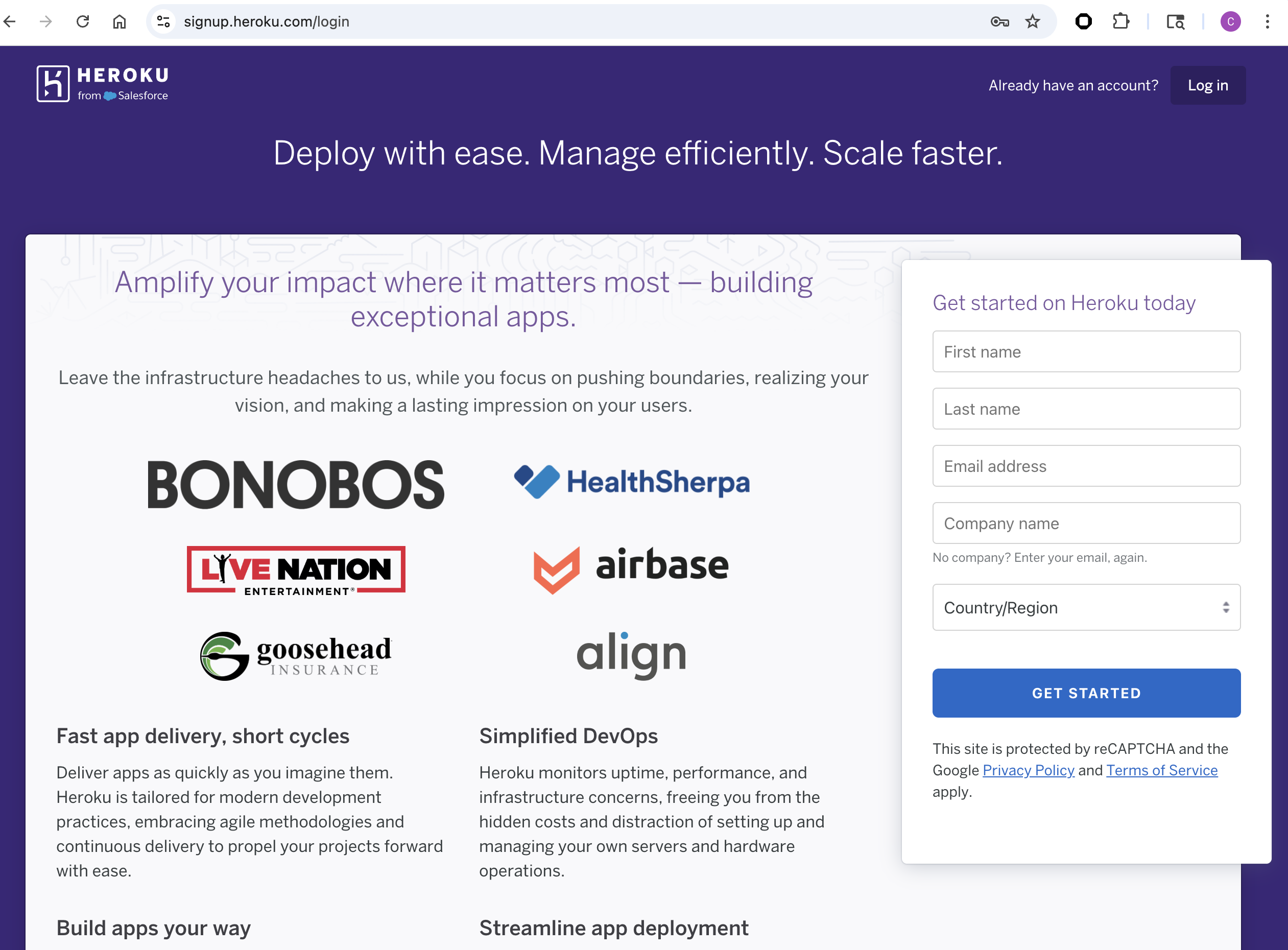
Create an account at heroku.com
Heroku Official Page (Ctrl + click)
-
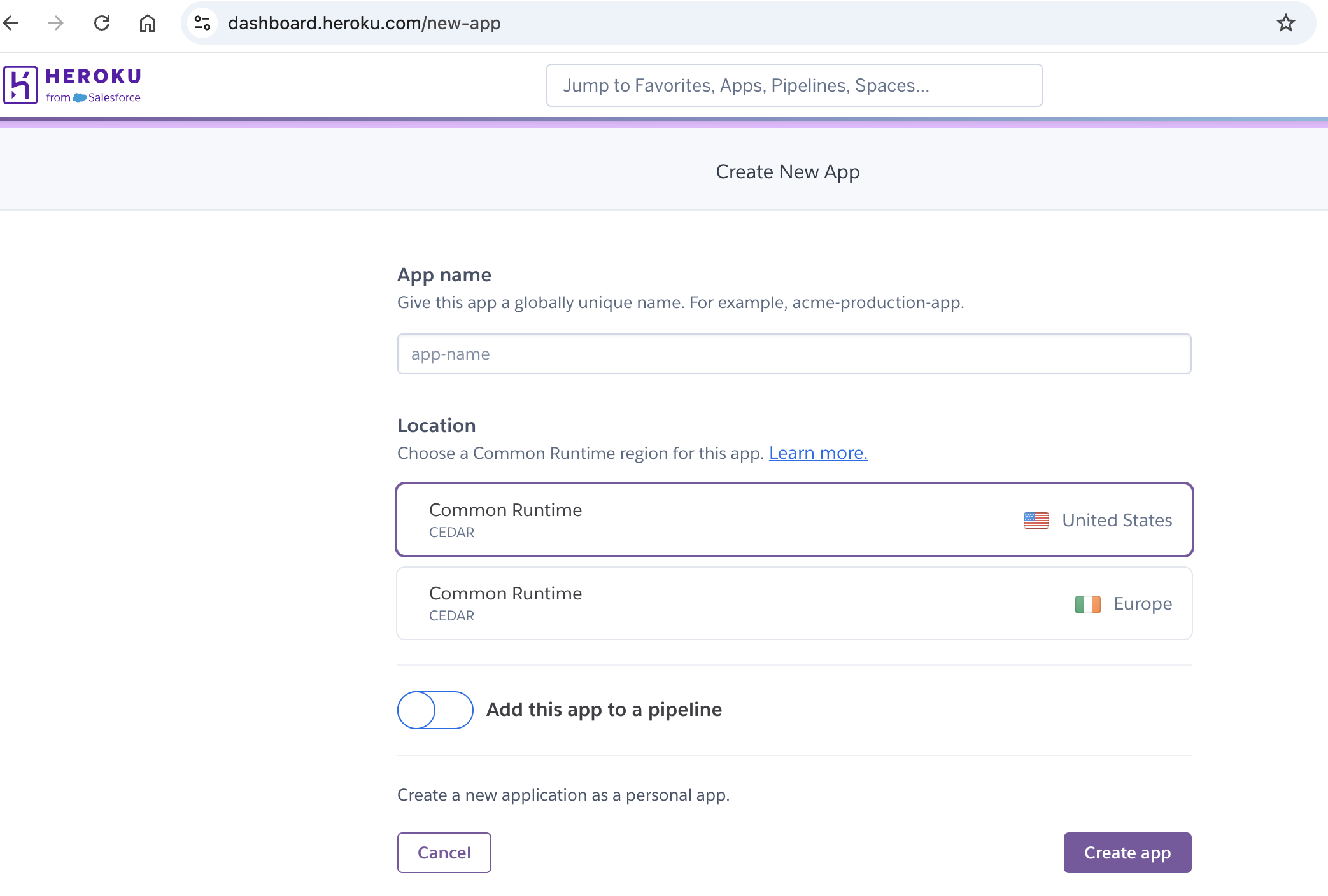
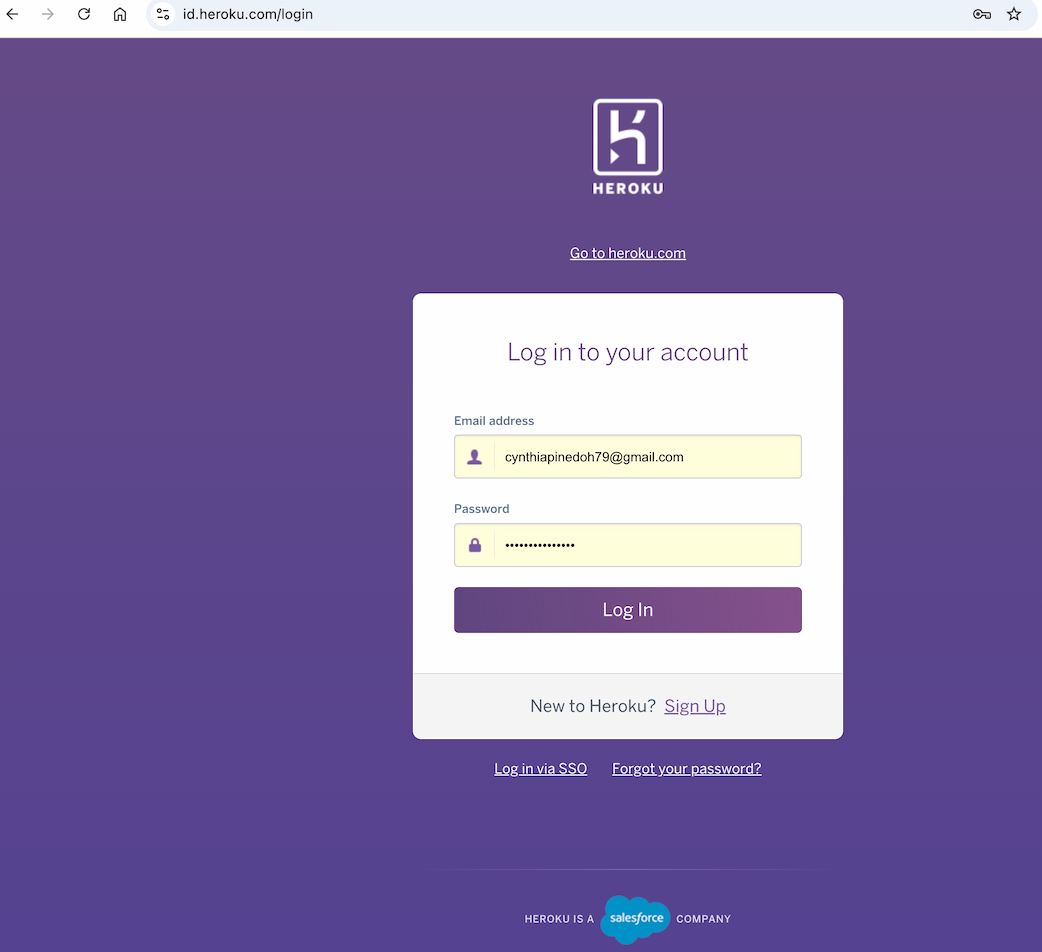
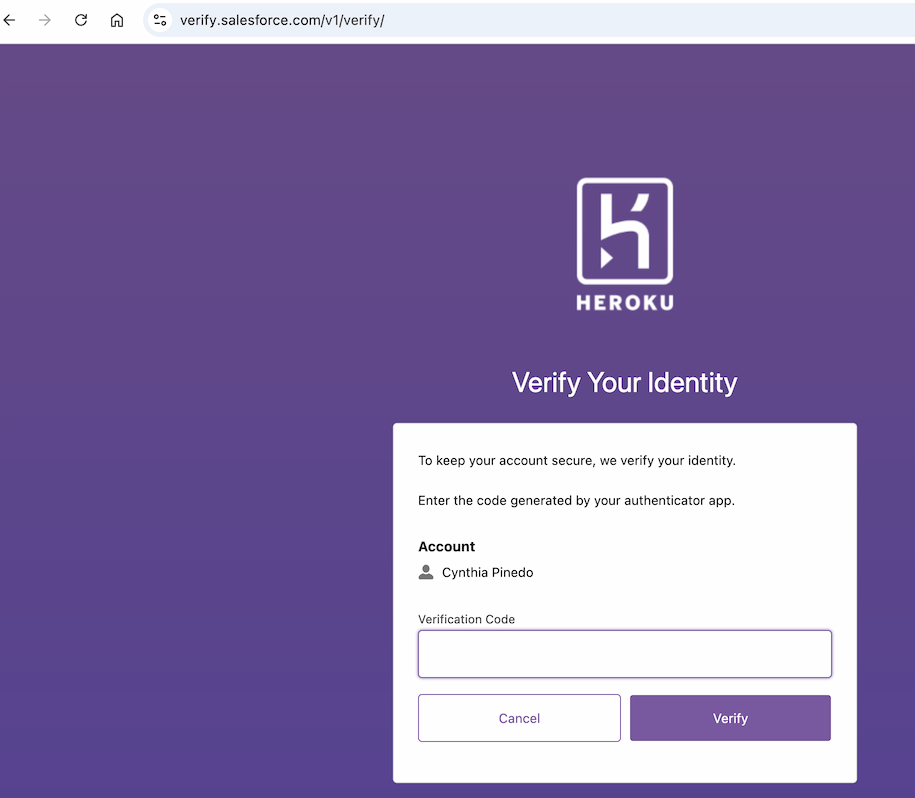
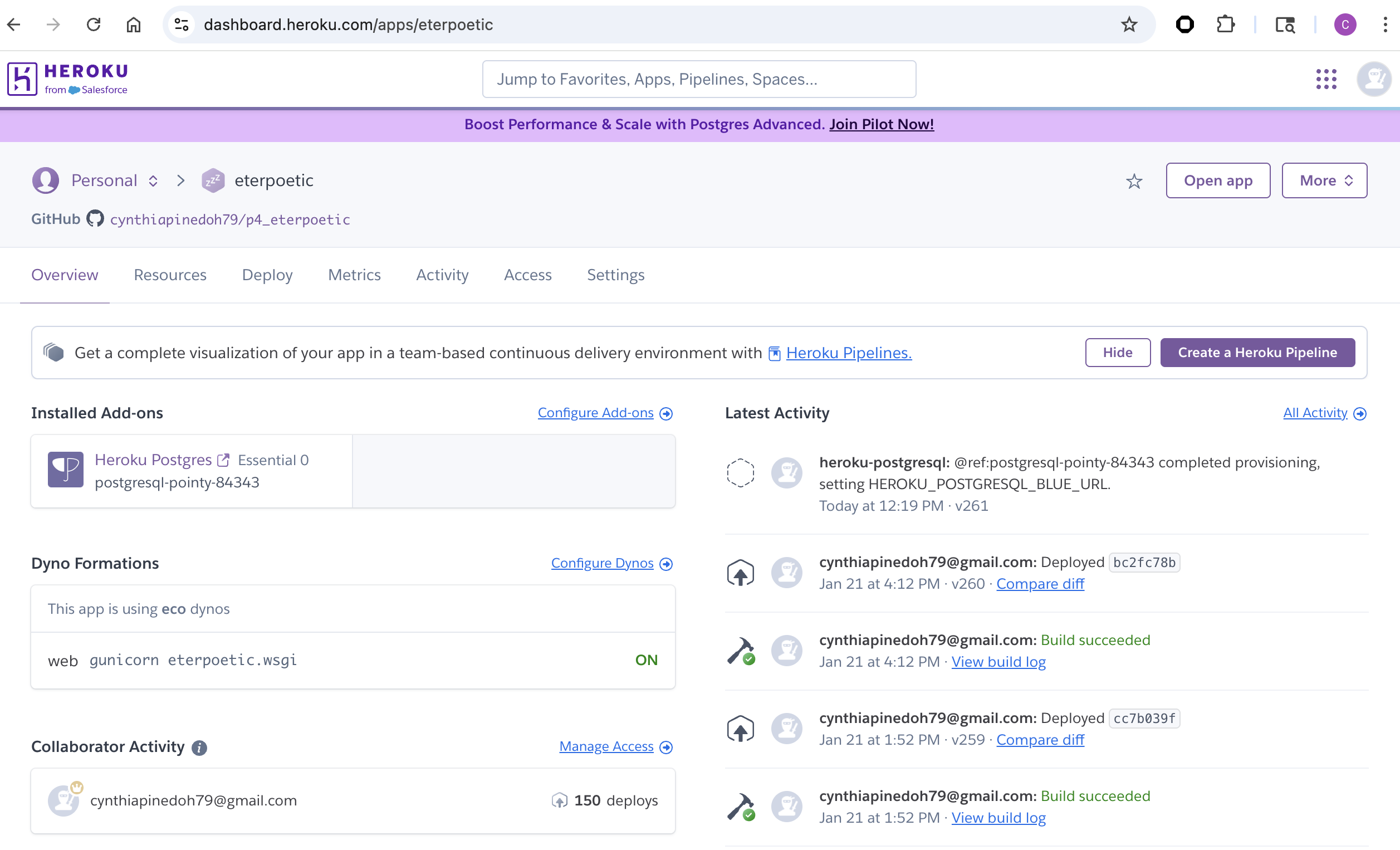
Create an app, give it a name for a Project, and select a region
-
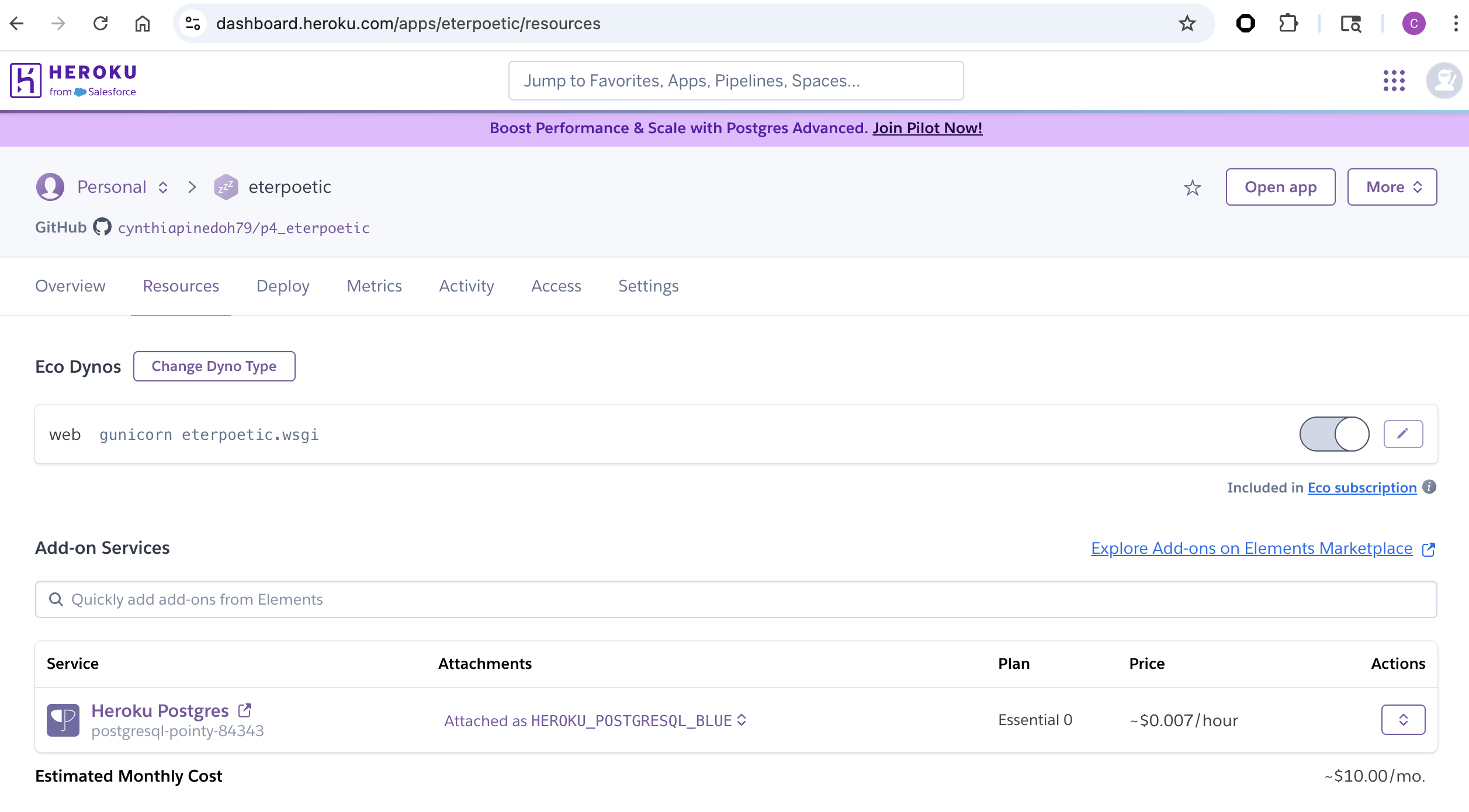
Under resources search for postgres, and add a Postgres database to the app
#### Heroku Postgres Setup
-
Heroku automatically provides DATABASE_URL via Config Vars. This variable is not stored locally and not committed to version control (env.py/.env)
- Install the plugins dj-database-url and psycopg2-binary.
pip3 install dj-database-url psycopg2-binary gunicorn-
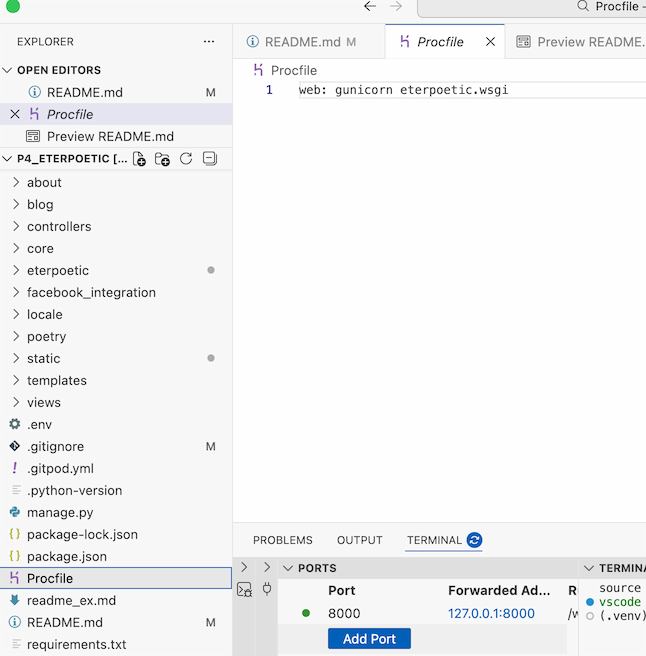
Create a Procfile with the text: web: gunicorn eterpoetic.wsgi
-
-
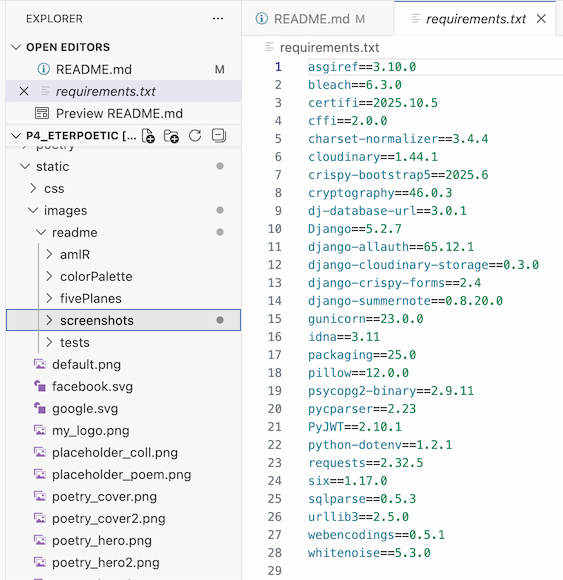
Run pip3 freeze > requirements.txt so both are added to the requirements.txt file
-
-
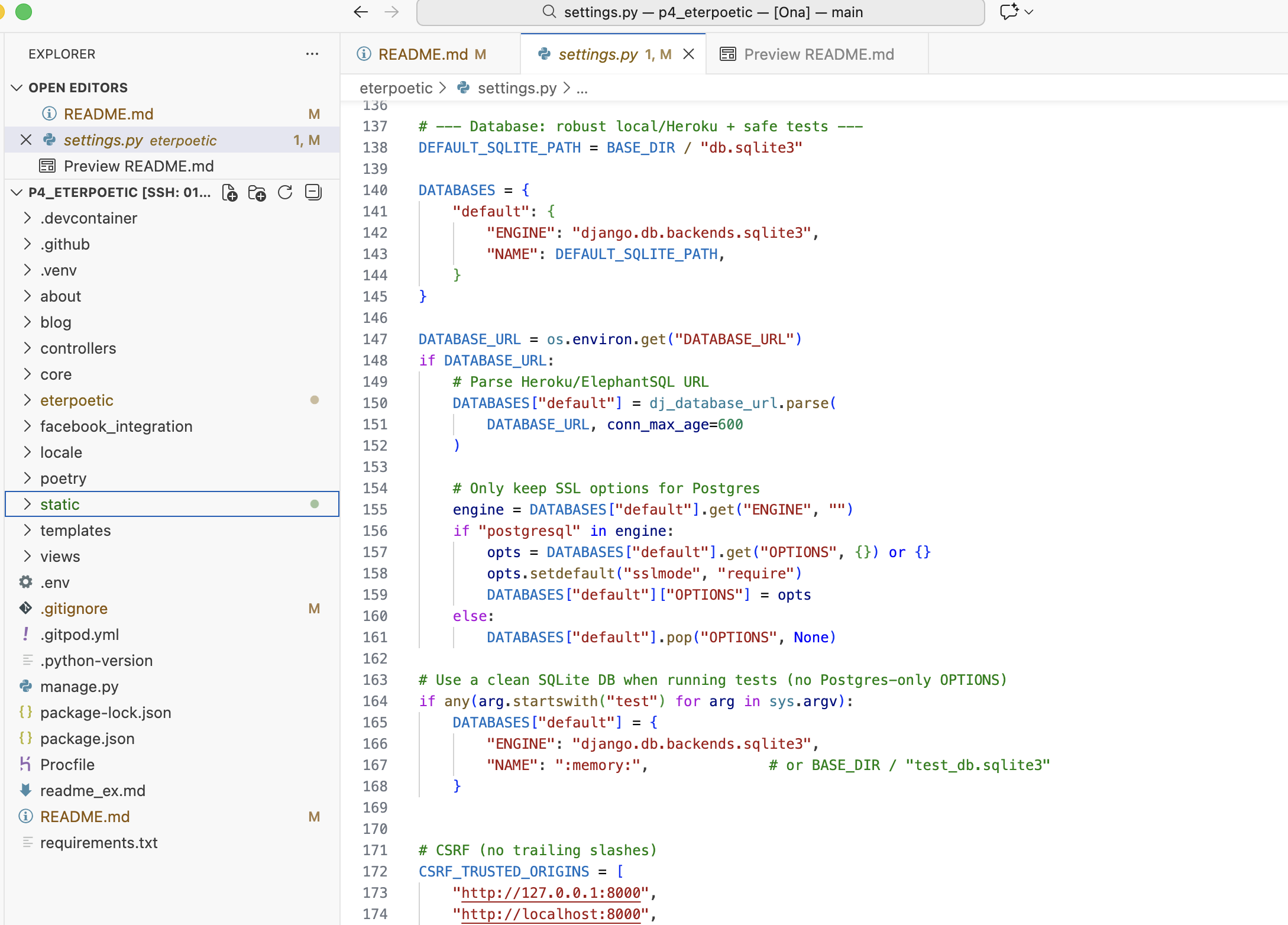
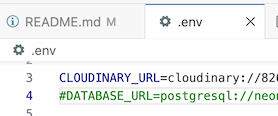
In the settings.py ensure the connection is to the Heroku postgres database, no indentation if you are not using a separate test database env.py/.env Remove or comment out DATABASE_URL in .env locally for Local → SQLite (db.sqlite3). Heroku → Postgres (via Config Vars). Clean separation
-
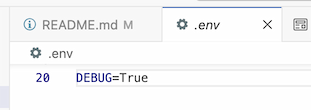
DEBUG is controlled via environment variables (DEBUG=True locally, DEBUG=False in Heroku Config Vars)
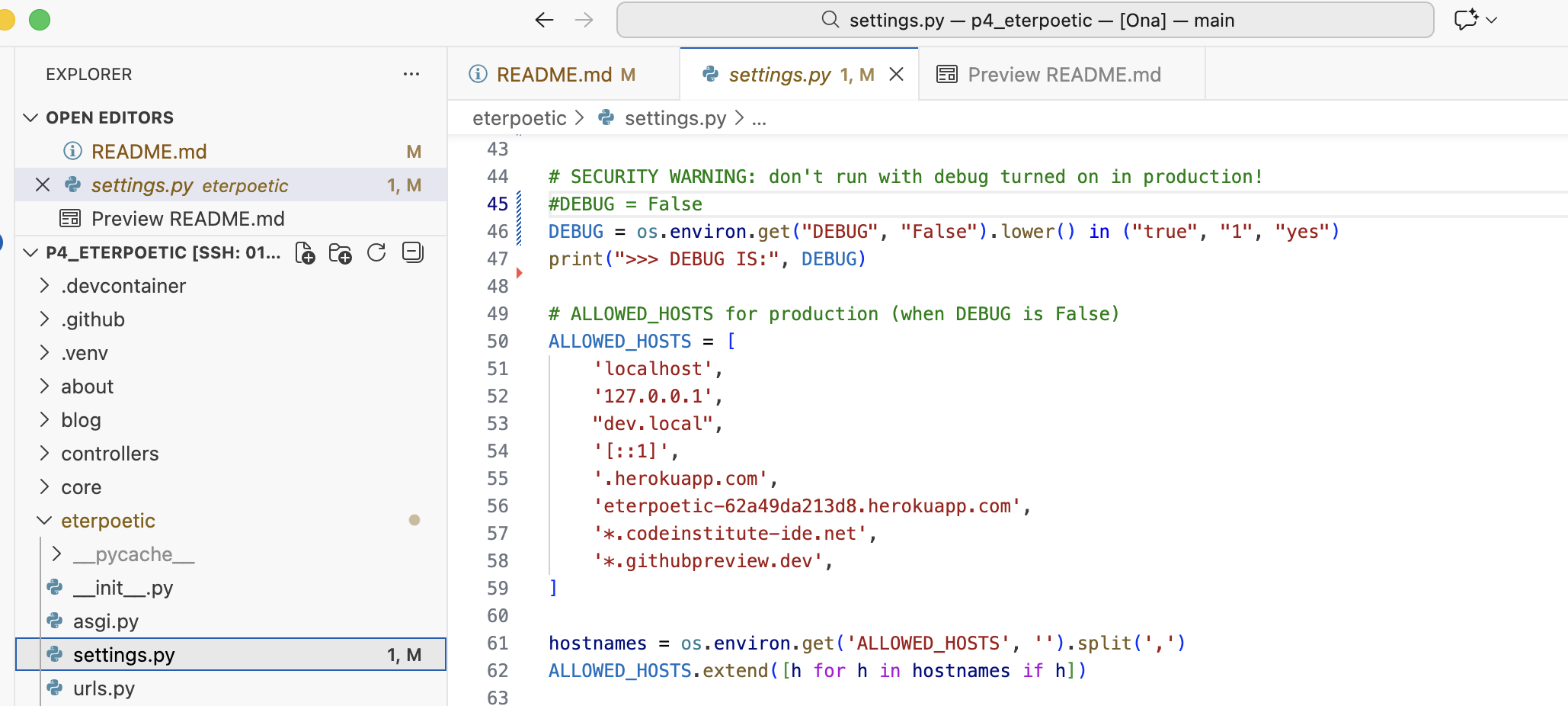

- Add localhost, and eterpoetic-62a49da213d8.herokuapp.com to the ALLOWED_HOSTS variable in settings.py
- localhost
- 127.0.0.1
- eterpoetic-62a49da213d8.herokuapp.com
-
Run “python3 manage.py showmigrations” to check the status of the migrations
- Run “python3 manage.py migrate” to migrate the database
Apply database migrations:
heroku run python manage.py migrate -a <app-name> - Run “python3 manage.py createsuperuser” to create a super/admin user
Create a superuser for administrative access:
heroku run python manage.py createsuperuser -a <app-name> - Run “python3 manage.py loaddata *.json” on the corresponding file /fixtures to create it
Optional: Loading Initial Data: If you have a data fixture (JSON), you can load it to the production database
heroku run python manage.py loaddata your_fixture.json -a <app-name> -
DISABLE_COLLECTSTATIC=1 may be used temporarily for troubleshooting and should be removed once static files are working correctly.
-
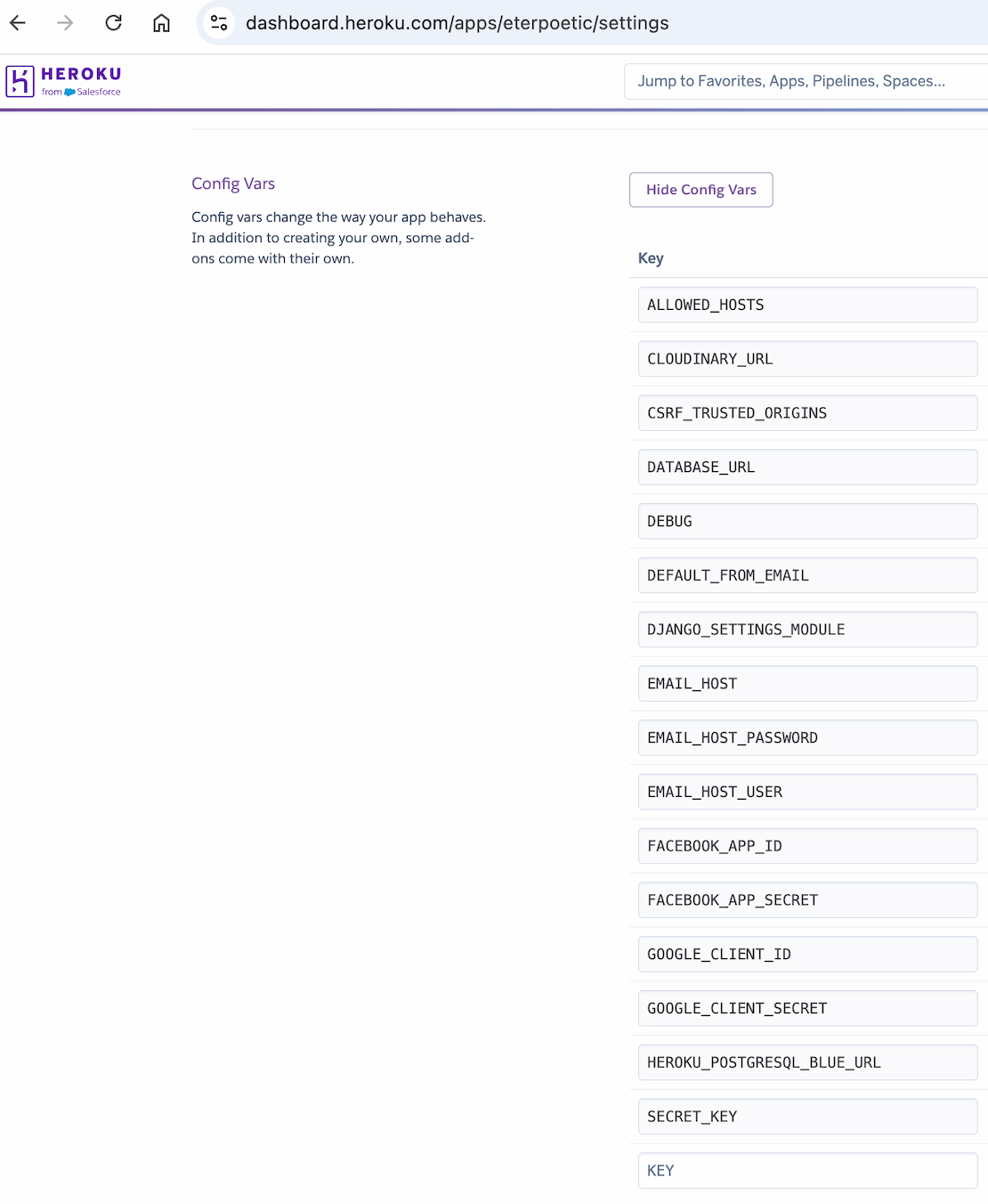
Ensure the following environment variables are set in Heroku
-
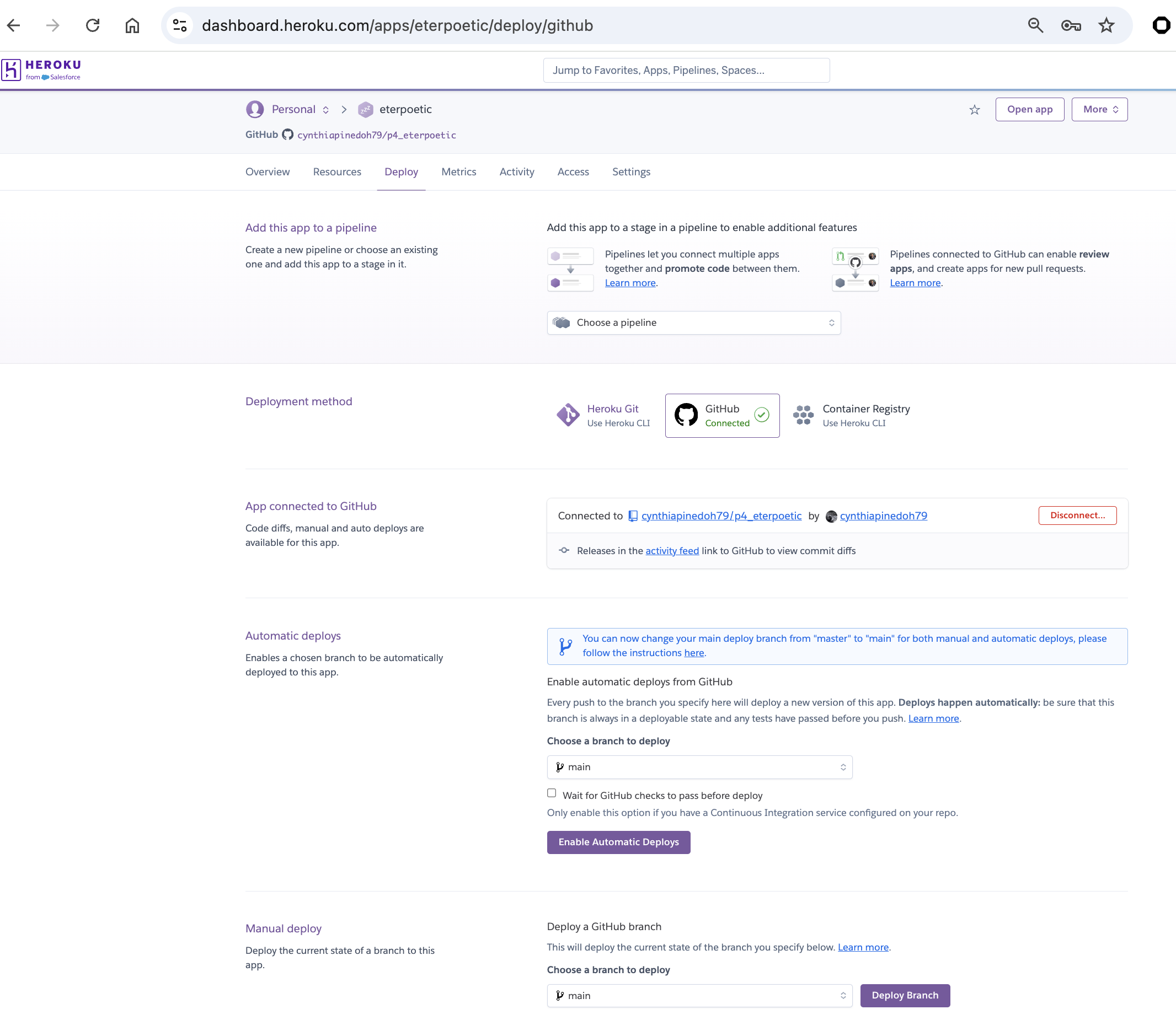
Connect the app to GitHub, and enable automatic deploys from main if you wish
-
Click deploy to deploy your application to Heroku for the first time In Deploy, connect the Heroku app to the GitHub repository Deploy the
mainbranch. - Click on the link provided to access the application or
Open the deployed application:
heroku open -a <app-name> - Troubleshooting
If deployment issues occur, review the Heroku build logs:
heroku logs --tail -a <app-name>
🖥️ Local Deployment
The project can be run locally by following the steps below. This allows another developer to clone, configure, and run the application in a development environment.
Security Note: Local environment variables must be stored in a local .env (or env.py) file, and this file must be included in .gitignore to ensure sensitive data is not committed to the repository.
- Clone the repository:
git clone <repository-url> cd p4_eterpoetic - Create and activate a virtual environment:
python3 -m venv .venv source .venv/bin/activate - Install project dependencies:
pip install -r requirements.txt -
Configure local environment variables (do not commit secrets or data with compromised information):
Config Var Purpose Importance SECRET_KEYDjango Local security key. Required. locally in .env DEBUGDevelopment mode True locally, False in production DATABASE_URLLocal DB connection. Required. PostgreSQL URL or a SQLite. CLOUDINARY_URLMedia storage API. Required. for images. GOOGLE_CLIENT_ID / GOOGLE_CLIENT_SECRETGoogle OAuth authentication. Optional FACEBOOK_APP_ID / FACEBOOK_APP_SECRETFacebook OAuth authentication. Optional EMAIL_HOSTSMTP server host Optional EMAIL_HOST_USERSMTP username Optional EMAIL_HOST_PASSWORDSMTP app password Optional DEFAULT_FROM_EMAILDefault sender email address Optional ALLOWED_HOSTSAllowed hostnames Required in production - Apply database migrations:
python manage.py migrate - Create a superuser:
python manage.py createsuperuser - Run the development server:
python manage.py runserver - Open the application in a browser: http://127.0.0.1:8000/
🐞 Deployment-Related Solved Issues
| Problem | What Caused It | How It Was Fixed |
|---|---|---|
| Heroku 500 Error on Startup | Heroku was using an outdated or invalid CLOUDINARY_URL, causing the application to fail during startup. |
Updated the Cloudinary environment variable in Heroku to the correct, active one. |
| Model Changes Not Applied on Heroku | Heroku’s database did not include the latest django_summernote migrations, resulting in warnings about unapplied migrations. |
Ran migrations on Heroku after pushing updated migration files. |
| Heroku CLI “command not found” | The Heroku command-line tool wasn’t installed or the system PATH wasn’t configured. | Installed Homebrew → fixed PATH → installed the Heroku CLI via Homebrew. |
| Heroku Misreading Command Flags | Heroku interpreted Django flags (e.g., --noinput) as Heroku flags. |
Added -- before the Django command: heroku run -- python manage.py collectstatic --noinput |
⚠️ Known Deployment Issues
| Known Issue | Status/Impact | Root Cause |
|---|---|---|
| Static File Deployment Cache | Intermittent: Front-end changes occasionally require hard refreshes (Ctrl/Cmd + Shift + R) to display on the live Heroku site. |
WhiteNoise + browser caching: static files are aggressively cached unless their hashed filenames change. If a file’s hash doesn’t update, browsers may continue serving the old version. |
Back to top
🤝 Contribution Guidelines
To ensure code quality and a clear project history, please adhere to the following guidelines when contributing:
🌳 Branch Naming Convention
When you begin new work, create a branch using one of these prefixes to clearly define the nature of your changes:
| Prefix | Use Case | Example |
|---|---|---|
feat/ |
New features or adding significant functionality. | feat/user-onboarding-flow |
fix/ |
Bug fixes or corrections to existing incorrect behavior. | fix/social-account-table |
docs/ |
Changes to documentation only (README, Wiki, guides). | docs/update-readme-bugs |
✅ Pull Request (PR) Requirements
Before a Pull Request can be merged into the main branch, it must satisfy these two core criteria:
- Passing Tests 🧪: All unit and integration tests must execute without failure.
- Clean Linting ✨: The code must pass all configured style and quality checks (linting).
Back to top
🙏 Credits & Acknowledgements
This project was made possible by the following resources and collaborators:
- Learning Materials: We gratefully acknowledge the comprehensive Code Institute learning materials that provided the foundational knowledge for this project.
- Documentation: Essential reference and guidance were provided by the official Django & Heroku documentation.
- Support: The continuous improvement and debugging efforts were guided by Mentor & Peer feedback.
- Community & Assistance: Special thanks to the Slack Community and Discord channels for technical assistance, troubleshooting advice, and peer support.
- Resources: General knowledge acquisition was supported by Google and YouTube.
- Troubleshooting: The extensive and successful resolution of development, deployment, and configuration issues was enabled by detailed Troubleshooting and debugging efforts.